


|
|
|
|
|
|
|
|
|
|
|
|
|
|
Available definition files
HRSA-defined performance measures
CORE and HAB Measures HRSA Defined
CORE01 - Viral Load Suppression
CORE02 - Prescription of Antiretroviral Therapy
CORE03 - Medical Visit Frequency
CORE04 - Gap in Medical Visits
Durable VL Performance Measure
NASTAD ADAP Monitoring Survey
NASTAD Viral Suppression Performance Measure
Import a performance measure file
Download the ZIP file for the measure you need. Extract the XML file from the ZIP file before you begin.
Step 1. Select Reports from the left menu.

Step 2. Select Performance Measures.
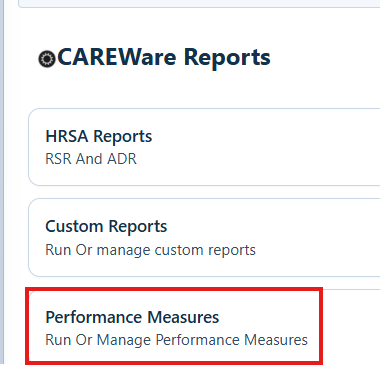
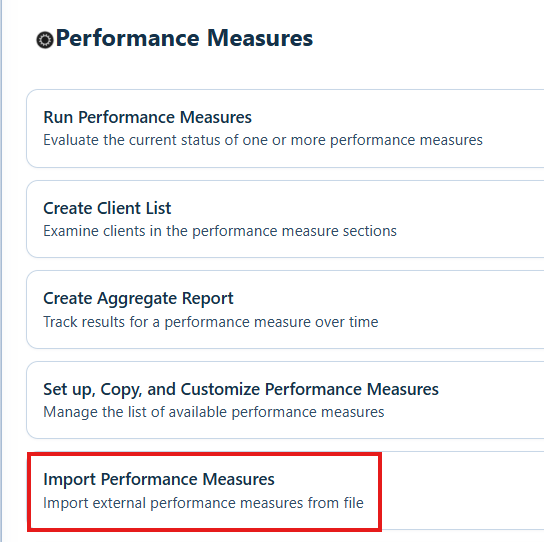
Step 3. Select Import Performance Measures.
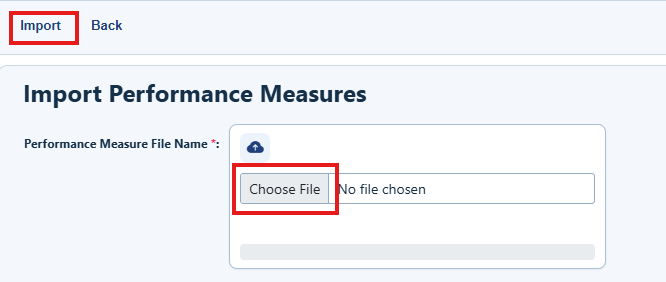
Step 4. Select Choose File, and then locate the XML file for the performance measure. Select Import.
How to confirm it worked
- The selected XML filename appears next to Choose File.
- After you select Import, CAREWare displays an upload completed message.
Troubleshooting and common questions
Why can’t I select the downloaded file?
The download is a ZIP file. Extract it first, and then select the XML file inside.
Where can I get HAB07Edited?
Contact the CAREWare Help Desk to request HAB07Edited.
Where can I find the newest HRSA definitions?
Use the HRSA Performance Measures page listed under Related References.
Related References
|
|
|
|
|
|
|
|
|


