You are using an unsupported browser. Please update your browser to the latest version on or before July 31, 2020.
close
You are viewing the article in preview mode. It is not live at the moment.
IMPORTANT: Upcoming Changes in CAREWare > Learn More
Pregnancy History
print icon


Purpose

Record pregnancy history in CAREWare 6 for reporting, quality management, and program needs.

Who should do this

CAREWare staff who enter or review pregnancy history in a client record.

Use this guide when you need to

Add a pregnancy record, review an existing record, or manage the pregnancy history list.

Main warning

Check all dates, the pregnancy outcome, newborn HIV status, and ART information before saving.


Quick path: Client record > Pregnancy History > Add > complete the pregnancy and ART fields > Save


Pregnancy History Data for the RSR

The First day of LMP field helps answer RSR Question 64, which asks whether the client was pregnant.

Important: Enter the First day of LMP accurately so pregnancy information is reported correctly.


Enter Pregnancy History in CAREWare

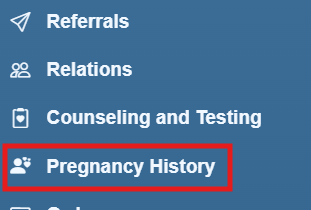
Step 1. Open the client record. Select Pregnancy History from the left menu.
Step 2. Select Add.
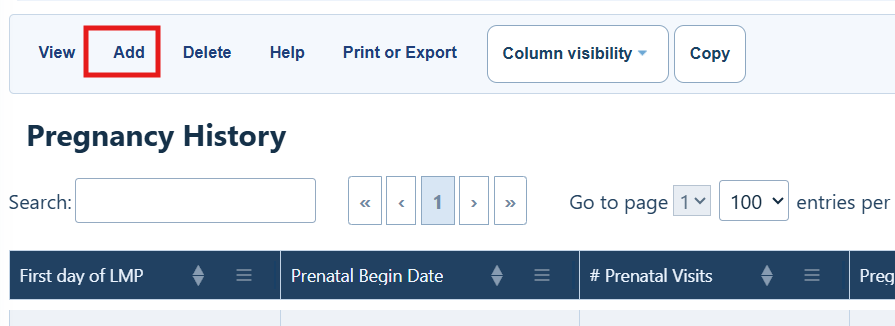
 

Pregnancy History Menu Options

Button

What it does

View

View details for an existing pregnancy record.

Add

Add a pregnancy record.

Delete

Delete an existing pregnancy record.

Help

Open the Pregnancy History user guide.

Print or Export

Print or export a list of pregnancy records.

Column Visibility

Show or hide columns in the Pregnancy History list.


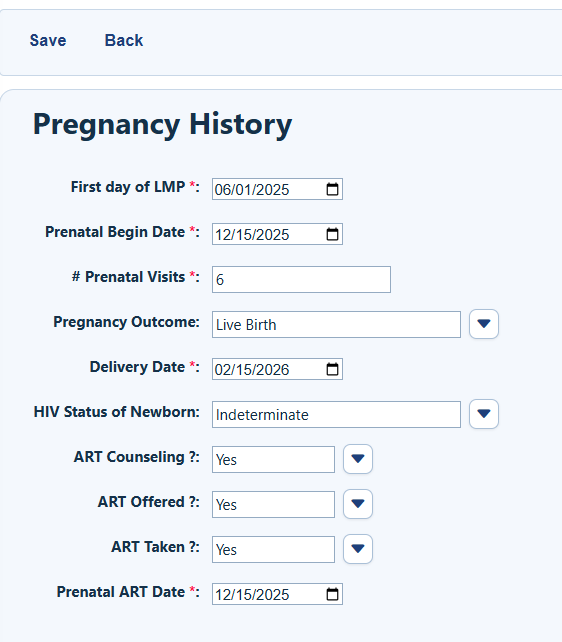
Step 3. Complete the fields for First day of LMP, Prenatal Begin Date, # of Prenatal Visits, Pregnancy Outcome, Delivery Date, HIV Status of Newborn, ART Counseling, ART Offered, ART Taken, and Prenatal ART Date.
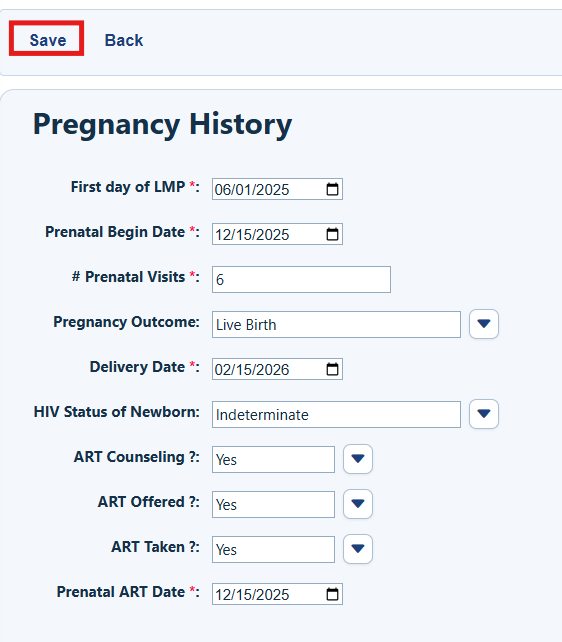
Step 4. Review the information. Select Save.
How to Confirm It Worked

Confirm that the new record appears in the Pregnancy History list and that the main dates and pregnancy details are correct.

Troubleshooting and Common Questions

What if I need to review a saved record?

Select the record in the Pregnancy History list, and then select View.

What if I entered the wrong information?

Open the record and correct the information if your access allows it. Review all fields again before saving.

How do I remove a pregnancy record?

Select the record, and then select Delete. Make sure you selected the correct record before you confirm.

Related References

Document

Use it for

RSR Documents

Documentation for the Ryan White Services Report (RSR), including field locations in CAREWare


Feedback
0 out of 0 found this helpful

Attachments

CAREWare_User_Guide__Pregnancy_History.pdf
scroll to top icon