


|
|
|
|
|
|
|
|
|
|
|
|
|
|
Personal Info at a glance
CAREWare stores a patient’s name, sex at birth, date of birth, and other basic data in Personal Info. Some fields can be edited while others are calculated automatically.
Fields calculated from Add Client
Some Personal Info fields are pre-filled when adding a client to CAREWare.
- First name, middle name (if provided in Add Client), and last name
- Sex at birth
- Date of birth
- URN and encrypted UCI
RSR and ADR reporting fields
The following Personal Info fields complete the RSR and ADR question:
- First Name, Last Name, Date of Birth, Sex at Birth, and Encrypted UCI are used for the Encrypted Unique Client Identifier in Q.SV4 of the RSR and Q.2 of the ADR.
- Sex at Birth: Q.71 of the RSR Client sex at birth and Q.14 of the ADR Client’s sex at birth.
- Date of Birth: Q.4 of the RSR Client’s year of birth and Q.9 of the ADR Client’s year of birth.
URN and eUCI
The Unique Record Number (URN) and the encrypted UCI (eUCI) are calculated by CAREWare based on the client’s first name, last name, date of birth, and sex at birth entered at the Add Client screen. The URN algorithm uses the:
- First and third letter of the first name
- First and third letter of the last name
- Date of birth (format MM/DD/YY)
- Sex at Birth code
- Unique suffix
Editing URN fields
Editing the patient’s first name, last name, date of birth, and sex at birth changes the client’s URN and eUCI. The values update after clicking Save. Special permissions must be granted to user accounts for editing URN fields.
LastService and Last Poverty Level
CAREWare automatically completes the fields LastService and Last Poverty Level. LastService is based on the most recent entry in the Services tab, and Last Poverty Level is based on the most recent poverty assessment in Annual Review. CAREWare displays a quality check if the patient’s record does not have at least one poverty assessment.
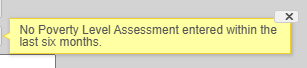
Quality check shown when no recent poverty level assessment is available.
How to confirm it worked
- Reopen Personal Info and confirm that the saved values appear.
- If a URN field changed, confirm that URN and encrypted UCI were recalculated.
Important notes
- Special permissions are required to edit URN fields.
- A poverty-level quality check indicates that no poverty assessment was entered within the last six months.
Troubleshooting and common questions
Why am I being prompted to add a suffix to the URN?
CAREWare automatically checks for clients with the same URN as the client being added. A unique suffix is used to delineate the two clients. For Example, Client 1 may have a URN of JHDE0101901U. If another client creates the same base URN of JHDE0101901, a unique suffix is used to ensure that the two client records remain separate. A unique suffix is used for the second client, such as an A, making the URN for that client JHDE0101901A.
Related References
|
|
|
|
|
|


